Wartune Ultra - EST Server

Ürünleri Seçin
Promosyon
Normal
Ödeme yöntemi


Wartune Ultra - EST Server
Wartune Ultra Official Top Up Site - EST Server - Exclusive Deals with Full Security, Only on JollyMax
🔥Enjoy Best Discount - JollyMax Exclusive Offer🔥
Important Notice:
Products on this page can only be topped up for the EST Servers.
Select other servers below if you are not in the EST Server.
| EST Server TOP UP | https://www.jollymax.com/app/wartune-ultra-americas |
| CET Server TOP UP | https://www.jollymax.com/app/wartune-ultra-europe |
| SGT Server TOP UP | https://www.jollymax.com/app/wartune-ultra-sgt |
Top Up instructions
Top up Wartune Ultra Balens and StarCoins at JollyMax now!
Balen is the primary currency of wartune. Its can be used in almost all areas of the game. There are two types of Balens, Unbound Balens and Bound Balens. Unbound Balens can be earned only by recharging. Bound Balens can be earned by playing game, it can't be recharged.
StarCoins can be used to exchange for in-game direct purchase items such as 'Monthly Pass', 'Warrior Bounty', 'Limited Special Pack', 'Balens', 'Growth Fund', and 'Platinum Gift Pack', etc.
Top up Wartune Ultra Balens and StarCoins at JollyMax, get safe and security services.
Wartune Ultra Balens and StarCoins Top Up Information
| Applicable Platform | Mobile game: IOS, Anddroid and Webgame |
| Incompatible Platform | Not applicable to the intermodal server |
| Applicable Server | Valid for EST Server, CET Server and SGT Server |
| Required Information | UID and Server ID |
| Delivery Time | Within 10 minutes for Balens and StarCoins |
About Wartune Ultra
The official mobile version of the 12-year-old classic web game Wartune is online! Designed and developed by 7Road, the original development team of Wartune, this fantasy turn-based strategy RPG game will take you back to the classic gameplays and amaze you with its brand-new skill systems and various battle strategies. It will surely give you an epic experience of turn-based battles!
| Game Name | Wartune Ultra |
| Genre | 7road International HK Limited |
| Price | Free-to-play (optional in-game purchases) |
| Platforms |
iOS/Android/Webgame |
How to Play and Download Wartune Ultra?
| Official Website | https://wartunelite.wan.com/ |
| Apple Store | https://apps.apple.com/us/app/wartune-ultra/id1570085024 |
| Google Play | https://play.google.com/store/apps/details?id=com.wan.wartuneh5 |
| WebGame | https://wartunelite.wan.com/ |
| Official Facebook | https://www.facebook.com/WartuneUltracht/ |
| Official Youtube | https://www.youtube.com/@WartuneUltra |
| Official Discord | https://discord.com/invite/7FxjHsg63d |
How to top-up Wartune Ultra Balens?
1. Select the product.
2. Enter Wartune Ultra Server ID and User ID.
3. Check out and select your payment method.
4. Upon successful payment, the Balens will be sent to your Wartune Ultra account directly.
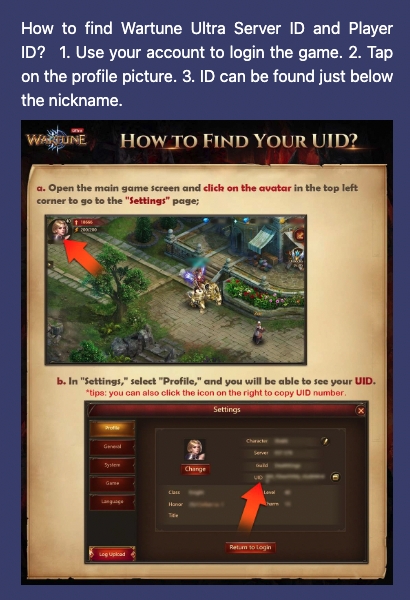
How to find Wartune Ultra Server ID and Player ID?
1. Use your account to login the game.
2. Tap on the profile picture.
3. ID can be found just below the nickname.
If my account is for the CET Servers, can I top up on this page?
Products on this page can only be topped up for the EST Servers.
Select other servers below if you are not in the EST Server.
| EST Server TOP UP | https://www.jollymax.com/app/wartune-ultra-americas |
| CET Server TOP UP | https://www.jollymax.com/app/wartune-ultra-europe |
| SGT Server TOP UP | https://www.jollymax.com/app/wartune-ultra-sgt |
| CET Server e-Voucher | https://www.jollymax.com/app/wartune-ultra-europe-evoucher |
How to redeem Wartune Ultra e-Voucher keys & In-game codes?
JollyMax Exclusive In-game Code: WTL-JM2026 (till March 31st, 2026); WTL-JMVIP3(till April 30th, 2026)
To redeem your rewards, simply follow these steps:
Step 1: Launch the game
Step 2: Tap benefits
Step 3: Select Event Prizes
Step 4: Type the desired code into the text box
Step 5: Tap redeem
Step 6: From the main game screen, open your mailbox
Step 7: Tap on the code redemption email, then tap claim
About JollyMax Services
- Why purchase Wartune Ultra Balens at JollyMax.com?
JollyMax website frees joy of game users via
> Official game partners: working directly with world's leading producers, JollyMax.com sells 10,000+ items of game and non-game apps on mobile, PC & laptop.
> Smooth & reliable top-up: JollyMax website offers game players 350+ easy & safe payment methods globally and locally.
> Localized customer support: JollyMax.com provides game players and app users with expert support in standard English and over 10 local languages.
> Suprisingly special offers: sign up and log in JollyMax website to access latest promotions for your favorite games or apps.
> Instant top-up delivery: items will be purchased online. - What are the solutions to resolve bank card / payment errors?
> If you buy several times in one day using the same bank card, it may trigger the bank's limit with the message "Transaction failed at issuer end due to risk control". Just try again after 24 hours or use another payment method.
> If you receive the message "Provider failed to process" , contact your bank for support as JollyMax can't help. - What should I do if I need more help?
Contact JollyMax customer sevice and help center for free
>customer service: (free to visit)
>help center:(free to visit) - If I entered the wrong game player ID when placing an order, how can I do?
> If you entered an existing account and the item has been delivered, then we request you to please be more cautious next time while inputting game player ID. Please unclick the "Remember Me" box below the user Game player ID and clear your browser's cache details to prevent this happen in the future.
> If you entered a non-existent account and the item has not been successfully delivered, then please create a new ticket and send us a message to provide the correct game player ID, and we will assist you.
About Wartune Ultra
- The official mobile version of the 12-year-old classic web game Wartune is online! Designed and developed by 7Road, the original development team of Wartune, this fantasy turn-based strategy RPG game will take you back to the classic gameplays and amaze you with its brand-new skill systems and various battle strategies. It will surely give you an epic experience of turn-based battles!
- Where to download and install Wartune Ultra before purchasing?
Before purchasing Wartune Ultra e-Voucher Keys, this App can be downloaded and installed from
> Apple App Store: iOS version (free download)
> Google Play Store: Android APK version (free download)
> Official game website: Android APK and iOS versions (free download)
Why is it prompting me: "Can't find my account"?
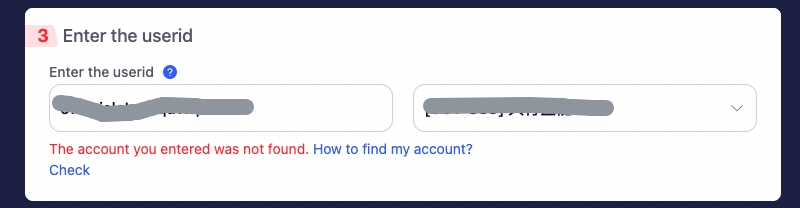
If you selected a pre-server-merger Server ID on JollyMax, you will receive the prompt: "Account not found." Please follow the instructions to locate your current correct Server ID in order to proceed with top-up on JollyMax.
- If you select a pre-server-merger Server ID on JollyMax, you will see the prompt
- How to find your current correct Server ID